

Feature

Crawler Log

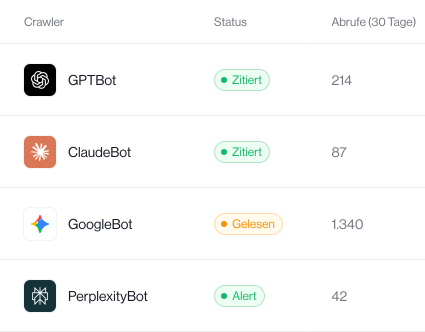
The crawler log shows you which AI crawler read which page and when, and what Reach OS delivered to it.

Who it is for

Marketing and web leads who want to know whether AI systems really read their pages.

Outcome

Every crawler request is traceable, instead of just assuming that AI reads your pages.

Why

Without a log, AI visibility stays a guess.

Many companies optimize for AI without ever seeing whether a crawler reads their pages at all. The crawler log makes every request visible.

Invisible requests

Many companies do not know whether GPTBot, ClaudeBot or PerplexityBot fetch their pages at all. Without a log, visibility in AI answers stays a guess, and errors only show up once the mentions fail to appear.

Every request logged

Reach OS logs every bot request at the edge and shows crawler, time, page and delivered content. This way you see in black and white what AI systems read. Visitors are not recorded.

Process

How it works

01.

Detect crawlers

Reach OS detects requests from known AI crawlers such as GPTBot, ClaudeBot and PerplexityBot directly at the edge, before your page is delivered. Detection is based on the providers' user agents and IP ranges. Normal visitors are not affected.

02

Deliver content

We deliver a bot-friendly version of your page to the detected crawler, with clean JSON-LD and an llms.txt as a guide. The content stays identical to what visitors see, just prepared in a machine-readable way. This way the AI can capture your information completely and correctly.

03

View the log

Every request lands in the log with crawler, page, time and delivered version. You see at a glance which pages were read and which are still missing. The log contains only bot requests, never visitor data.

Benefits

Why it pays off.
Three benefits you notice in everyday work.

Traceable

You see which crawler read which page and when.

Privacy compliant

Only bot requests are logged, never visitors.

You set the rules

Explicit allow rules for GPTBot, ClaudeBot and PerplexityBot, approved by you.

Test Reach OS on your domain.
Free check in 30 seconds. No sign-up.

Check for free now

"We show up right away when people ask ChatGPT, Claude or Google where they can sell their motorcycle in Munich."

Florian Alt

Managing Director, Motorradankauf München

#1

in all AI assistants

+230% inquiries

through AI-generated answers

-20% ad budget

for Google and agencies

Technology

Under the hood. Four technical details you can verify.

{"time": "09:14:02", "bot": "GPTBot", "path": "/pricing", "status": 200, "served": "json-ld"}
{"time": "09:14:05", "bot": "GPTBot", "path": "/features", "status": 200, "served": "json-ld"}
{"time": "09:21:47", "bot": "ClaudeBot", "path": "/pricing", "status": 200, "served": "json-ld"}
{"time": "09:33:10", "bot": "PerplexityBot", "path": "/docs", "status": 200, "served": "llms.txt"}
Every request is logged

You see which crawler read which page and when, and which version Reach OS delivered to it.

User-agent: GPTBot
Allow: /

User-agent: ClaudeBot
Allow: /

User-agent: PerplexityBot
Allow: /
You decide who reads

Explicit allow rules for GPTBot, ClaudeBot and PerplexityBot. Approved by you, not guessed.

{
  "@context": "https://schema.org",
  "@type": "SoftwareApplication",
  "name": "Reach OS",
  "applicationCategory": "BusinessApplication"
}
Every page, not just the homepage

JSON-LD for every subpage, plus an llms.txt as a guide. Complete instead of spot checks.

## 2026-10
- Schema: 14 pages updated
- llms.txt: 3 new entries
- Crawler rules: unchanged
A little better every month

Every month we check schema and content and fine-tune per platform.

Frequently asked questions

Which AI crawlers are logged?
Does this slow down my site?
Can I exclude certain crawlers?
Is visitor data stored?
How long is the log data stored?
Do I need technical knowledge for this?

Another feature

This fits well. A feature that complements this one.

Feature

FAQ Schema

Reach OS marks up question-answer pairs as FAQPage schema. This way your pages give AI systems ready-made answers that can be cited directly.

Discover feature

Feature

Entity Linking

Reach OS links your company via sameAs to Wikidata, Wikipedia and Google Business Profile and keeps name, address and phone identical everywhere.

Discover feature

Feature

Answer Structure

Reach OS rebuilds your content according to the answer-readiness principle: answer first, questions as headings, lists instead of running text.

Discover feature

Feature

Docs and Wiki Hub

The Docs and Wiki Hub is a knowledge area on a subdomain of your site. It answers your customers' questions in articles that AI systems can read directly.

Discover feature

Feature

Crawler Access

Reach OS sets explicit allow rules for GPTBot, ClaudeBot and PerplexityBot in your robots.txt. You decide who may read.

Discover feature

Feature

Domain Check

The Domain Check tests for free in about 30 seconds how well your domain is prepared for AI search. No signup, based on five signals.

Discover feature

Feature

Citation Monitoring

Reach OS regularly checks whether and how ChatGPT, Perplexity, Gemini and Copilot cite you, and adjusts content per platform.

Discover feature

Feature

Authority and Trust

Reach OS strengthens E-E-A-T on your site: visible authors, supported statements and consistent facts. This way an AI system rates you as a reliable source.

Discover feature

Feature

llms.txt

Reach OS creates and maintains your llms.txt, a structured guide that shows AI systems which content on your domain matters.

Discover feature

Feature

Edge Injection

Reach OS delivers schema, FAQ and llms.txt at the edge into the initial HTML. This way even AI crawlers without JavaScript see all the data.

Discover feature

Feature

Crawler Log

The crawler log shows you which AI crawler read which page and when, and what Reach OS delivered to it.

Discover feature

Feature

Schema Markup

Reach OS generates matching JSON-LD for every subpage, so AI systems can clearly attribute and cite your content.

Discover feature